


Hey developers!
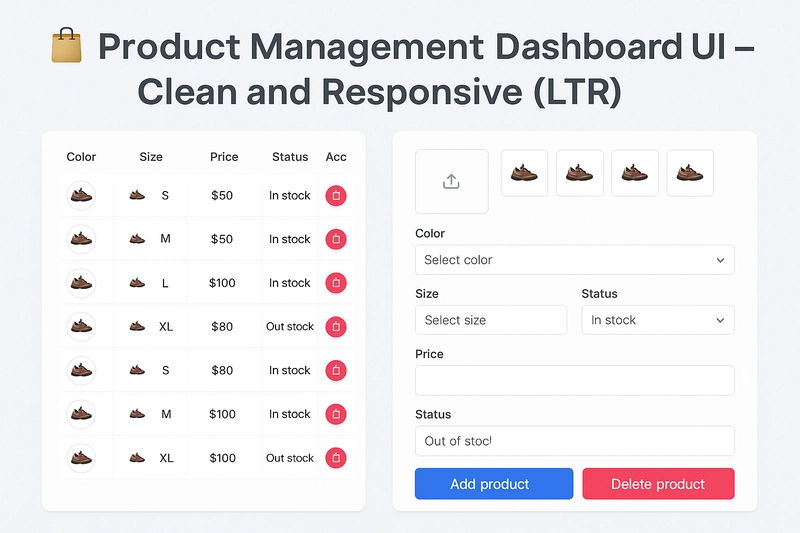
In this post, I’m excited to share a custom Product Management Interface I built for an admin dashboard. This UI is designed with clean layout principles and a user-friendly experience to manage product variants efficiently.
🧪 Live Demo on CodePen:
👉 https://codepen.io/DocTorWeB121/pen/jEPEMNd
🎯 Project Goal
The aim of this task was to create a modern and clean product entry interface that allows the admin to:
- Upload multiple product images
- Define product variations by color and size
- Set prices and stock status
- View, edit, and delete product entries from a dynamic list
It’s fully responsive and follows LTR layout for English users.
🧩 Key Features
🖼️ Image Upload Section
- Drag-and-drop or file-select image upload
- Live image preview with delete buttons
- Maximum of 5 images per product
🎨 Color & Size Selection
- Dropdown menus to select product color and size
- Sizes like S, M, L, XL, etc.
💰 Price Input & Stock Status
- Input field for product price
- Option to set availability status: In Stock / Out of Stock
- If "Out of Stock" is selected, an additional field appears for expected restock price
🧾 Product Variants Table
- Displays all added variants in a structured table
- Each row shows color, size, quantity, price, and image
- Edit and delete actions with icons
- Clean, compact layout with hover effects
🖥️ Responsive Design
- Mobile-first approach
- Adapts well to different screen sizes
- Uses CSS Flexbox and Grid for layout alignment
🛠️ Technologies Used
- HTML5 – semantic structure
- CSS3 – modern layout (Flexbox, Grid) and styling
- JavaScript – to manage dynamic behaviors (image preview, conditional fields)
- Font Awesome – for action icons (edit, delete, confirm)
🚀 Live Preview
Check the full live version here:
🔗 CodePen Demo
💡 Ideas for Enhancement
Here are some features you could add in future versions:
- Backend integration (store products in a database)
- Field validation and user feedback
- Multilingual support
- Modal-based editing for a smoother UX
- Drag-and-drop for reordering images or products
🙌 Final Thoughts
This UI is great for any admin dashboard where managing product variations is needed — such as in e-commerce websites or inventory systems. It’s built from scratch with pure HTML, CSS, and JavaScript, making it flexible and framework-agnostic.
Let me know your thoughts in the comments, or feel free to fork and improve it. Happy coding! 🚀


Top comments (3)
This is a brilliantly executed product management dashboard UI — clean, intuitive, and responsive! The image upload section with preview and deletion, as well as the conditional stock availability feature, really show attention to detail. I especially appreciate the use of pure HTML, CSS, and JavaScript, keeping the solution lightweight and adaptable.
For anyone exploring tools to streamline product development workflows, I recently came across a great read on the best product development software list in 2025 — it might offer valuable insights for future enhancements or backend integrations. Keep up the awesome work!
Growth like this is always nice to see. Kinda makes me wonder - what keeps stuff going long-term? Like, beyond just the early hype?
Really solid work, I always appreciate a clean build like this.
Some comments may only be visible to logged-in visitors. Sign in to view all comments.