

I just required to change the look for the integrated terminal, and I just figured out how easy is this.
So…. here you have a happy walk around to do it 🙂
- Go to the settings (In VSCode obviously)
- On Windows/Linux - File > Preferences > Settings
- On macOS - Code > Preferences > Settings
- Shortcut (⌘,)
- Search (⇧⌘P) → “Preferences: Open Settings”
- Search for "workbench: color customizations" and open the settings.json file
-
Edit or Paste your configuration under workbench.colorCustomizations
"workbench.colorCustomizations": {
"terminal.background":"#1D2021",
"terminal.foreground":"#A89984",
"terminalCursor.background":"#A89984",
"terminalCursor.foreground":"#A89984",
"terminal.ansiBlack":"#1D2021",
"terminal.ansiBlue":"#0D6678",
"terminal.ansiBrightBlack":"#665C54",
"terminal.ansiBrightBlue":"#0D6678",
"terminal.ansiBrightCyan":"#8BA59B",
"terminal.ansiBrightGreen":"#95C085",
"terminal.ansiBrightMagenta":"#8F4673",
"terminal.ansiBrightRed":"#FB543F",
"terminal.ansiBrightWhite":"#FDF4C1",
"terminal.ansiBrightYellow":"#FAC03B",
"terminal.ansiCyan":"#8BA59B",
"terminal.ansiGreen":"#95C085",
"terminal.ansiMagenta":"#8F4673",
"terminal.ansiRed":"#FB543F",
"terminal.ansiWhite":"#A89984",
"terminal.ansiYellow":"#FAC03B"
}
After that little change, you can check your integrated terminal in VS Code

You can find several predefined templates here:
https://glitchbone.github.io/vscode-base16-term/#/
>https://code.visualstudio.com/docs/getstarted/settings
>
>https://code.visualstudio.com/api/references/theme-color
>
>https://glitchbone.github.io/vscode-base16-term/#/


Top comments (22)
Hey can you tell me how can I change my terminal from
to
Thanks in advance.
Hi, You need to look for this configuration zsh(shell) + oh-my-zsh(framework on top of shell)
"terminal.background":"#231F20",
"terminal.foreground":"#D9D8D8",
"terminalCursor.background":"#D9D8D8",
"terminalCursor.foreground":"#D9D8D8",
"terminal.ansiBlack":"#231F20",
"terminal.ansiBlue":"#009DDC",
"terminal.ansiBrightBlack":"#737171",
"terminal.ansiBrightBlue":"#009DDC",
"terminal.ansiBrightCyan":"#85CEBC",
"terminal.ansiBrightGreen":"#00853E",
"terminal.ansiBrightMagenta":"#98005D",
"terminal.ansiBrightRed":"#EE2E24",
"terminal.ansiBrightWhite":"#FFFFFF",
"terminal.ansiBrightYellow":"#FFD204",
"terminal.ansiCyan":"#85CEBC",
"terminal.ansiGreen":"#00853E",
"terminal.ansiMagenta":"#98005D",
"terminal.ansiRed":"#EE2E24",
"terminal.ansiWhite":"#D9D8D8",
"terminal.ansiYellow":"#FFD204"
blog.joaograssi.com/windows-subsys...
Did u get an answer
yes
Use WSL windows with zsh
youtube.com/watch?v=-atblwgc63E
Ok but I have a mac
Zsh is the default shell on the latest MacOS
Install:
How can I get this?
What theme did you use in your vscode ?
marketplace.visualstudio.com/items...
Beautiful theme!
BTW if you're using Zsh now, you should also checkout OhMyZsh + PowerLevel 9000
freecodecamp.org/news/jazz-up-your...
Background/Foreground colors are changed correctly, but these changes don't seem to affect the command line itself, meaning the stuff I type after the prompt. For example, "ls --all" displays the "ls" in yellow, and the option "--all" in dark gray, independently of the color I choose for background/foreground. The dark gray is particularly annoying, since it's almost invisible. How can I change that?
Hi, this article was great, thank you! I use the MS Dos theme, which is great, but I don't like the terminal much tbh. This method let me change the terminal, but not the Problems, Output, Debug Console or my SQL console. Is there a way to set these colors, or revert them to the default while keeping the rest of the msdos theme?
Hey, do you have any idea why nothing changes in my terminal when I add a theme customization?
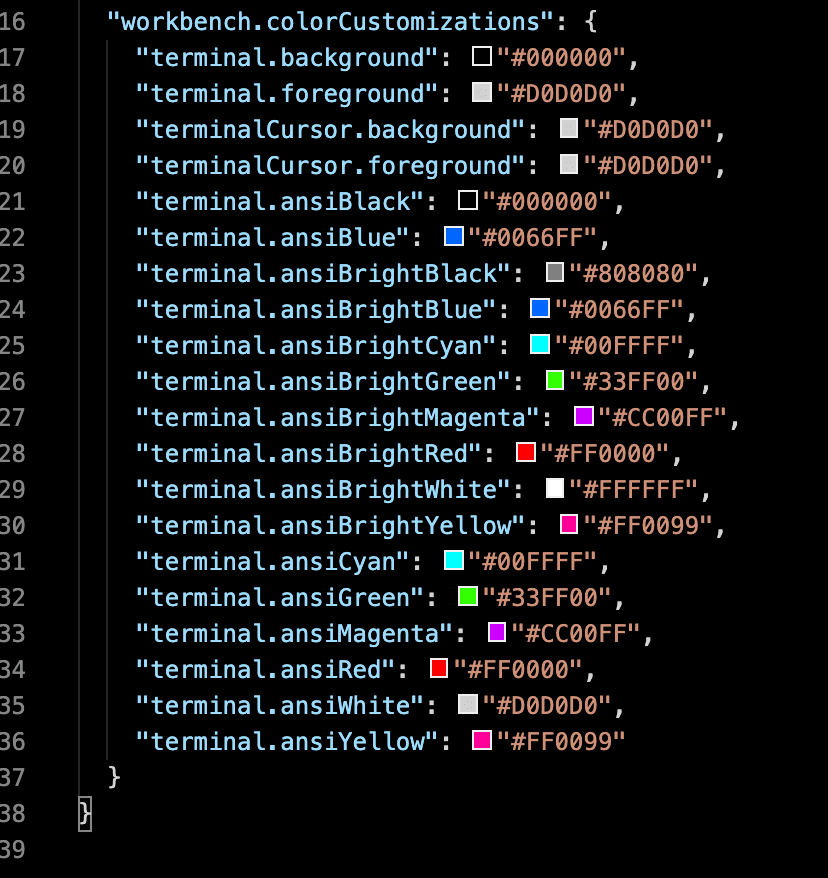
Perhaps you could try this:
glitchbone.github.io/vscode-base16...
thanks a lot, really appreciate it.
Exactly what I needed, thanks.
thanks for posting this!
I did not get it can anyone helpp.
what do you mean by settings dictionary?